



Electronic invoice lifecycle: from Magento emission to final status
A detailed walkthrough of the 7 stages an electronic invoice goes through between its emission from Magento 2 or Adobe Commerce and its final status, with the statuses returned along the way and what to do when an invoice is rejected.
In this article
- Key takeaways
- Overview of the cycle
- Stage 1 - Invoice creation in Magento
- Stage 2 - Extraction and normalization by the Compatible Solution
- Stage 3 - Transmission to the sender Approved Platform
- Stage 4 - Validation by the sender PA
- Stage 5 - Routing via the central DGFiP directory
- Stage 6 - Transmission to the recipient PA
- Stage 7 - Reception and processing on the recipient’s side
- Main statuses at a glance
- Handling rejections and manual replay
- Monitoring from Magento: what your operator needs to see
- Traceability and 10-year archiving
- Wrapping up
- Going further
Key takeaways
- The mandate is in force: since September 1st, 2026, every company receives its B2B invoices through an Approved Platform; emission already applies to large enterprises and mid-caps, and will apply to SMBs and micro-businesses from September 1st, 2027. The cycle described here is the one every issued invoice goes through today.
- A French B2B electronic invoice goes through 7 stages between its emission from Magento 2 or Adobe Commerce and its final acceptance by the recipient.
- The cycle is automated but must be monitored: returned statuses, technical rejections, manual replays, fiscal traceability, etc.
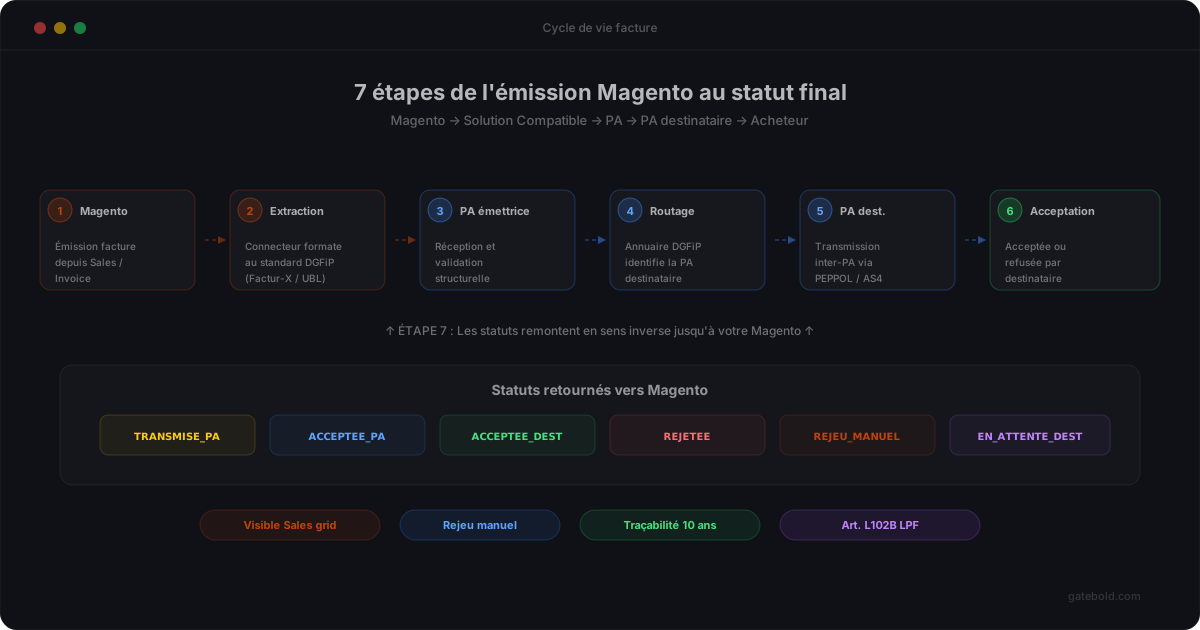
- The statuses returned by the Approved Platform (Plateforme Agréée) must be visible from Magento (Sales grid, dedicated dashboard, etc.) so you don’t discover anomalies a month too late.
- In case of a technical rejection (missing data, invalid format, etc.), your Compatible Solution must allow a manual replay without re-invoicing.
- 10-year traceability is mandatory, just like for classic paper invoices.
Overview of the cycle
An electronic invoice is not a single “emission” event. It travels through a structured lifecycle made of several stages, each with its own statuses, delays and possible anomaly cases. Understanding this cycle is essential to equip your Magento store properly and anticipate day-to-day operations (monitoring, rejections, reprocessing).
Here are the 7 main stages of a French B2B invoice emitted from Magento, from the moment it is created until the moment it is definitively accepted by the recipient.
Stage 1 - Invoice creation in Magento
Actor: your store, via Magento Sales / Invoice.
What happens. You validate a B2B order and trigger the creation of an invoice from the Magento interface. The invoice is stored in the database with its number, date, total amount including VAT, VAT breakdown, line items and legal mentions. At this point, the invoice exists only inside your Magento.
Required data. All mandatory fields of the EN 16931 norm: sender and buyer SIRET, intra-community VAT identifiers, per-line legal mentions, VAT breakdown by rate, payment terms, etc. If this data is missing or inconsistent, the rest of the cycle will fail. This is why the initial data audit matters so much.
Duration: instantaneous (single creation) or batch (grouped creation if you run an order shipping workflow).
Stage 2 - Extraction and normalization by the Compatible Solution
Actor: your Magento Compatible Solution (the connector).
What happens. The connector detects the new invoice (through a Magento hook, an event listener, or polling depending on the architecture), pulls its structured data, and normalizes it against the EN 16931 semantic model, ready for your Approved Platform. The PA then produces the regulatory format: Factur-X by default for most French merchants, UBL or CII per recipient.
Technical checks. The Compatible Solution validates data consistency before transmission: SIRET in the right format, VAT correctly broken down, balanced amounts, mandatory mentions present, etc. If an anomaly is detected, the invoice is flagged “in error” on the Magento side without being transmitted, so it can be corrected first.
Duration: typically a few seconds per invoice, less when invoices are batched for high volumes.
Stage 3 - Transmission to the sender Approved Platform
Actor: your Compatible Solution towards your PA.
What happens. The connector opens a secure connection to your Approved Platform (REST API aligned with AFNOR XP Z12-013, etc.) and transmits the normalized invoice data. The PA acknowledges receipt immediately with a unique transmission identifier. At this point, the invoice is “transmitted to the PA” but not yet validated.
Status: TRANSMISE_PA (or the equivalent in your PA’s nomenclature).
Duration: a few seconds in normal online mode.
Stage 4 - Validation by the sender PA
Actor: your Approved Platform.
What happens. The PA runs its structural checks on the received invoice: compliance with the XSD schema (Factur-X, UBL, CII), compliance with the EN 16931 norm, presence of mandatory fields, basic business consistency (amounts, dates, optional signature), etc. Two possible outcomes:
- Structurally accepted: the invoice moves on to routing. Status
ACCEPTEE_PA_EMETTRICE. - Technically rejected: the invoice is returned with an explicit error code (invalid SIRET, non-compliant format, etc.). Status
REJETEE_PA_EMETTRICE, followed by the rejection code.
Duration: a few seconds to a few minutes depending on the PA’s load.
Stage 5 - Routing via the central DGFiP directory
Actor: the sender PA, querying the central DGFiP directory.
What happens. The sender PA queries the central DGFiP directory to identify the recipient’s PA (every registered French company has a declared PA). The directory is kept up to date by the DGFiP with all active SIREN numbers and their reference PA.
Status: ROUTAGE_EN_COURS.
Anomaly cases: recipient not registered in the directory (company still being registered, etc.), recipient PA temporarily unavailable. The sender PA will retry according to a defined strategy or return a pending status.
Duration: usually instantaneous if the directory is reachable, otherwise a few hours.
Stage 6 - Transmission to the recipient PA
Actor: your sender PA towards the recipient’s PA.
What happens. Once the recipient’s PA is identified, your PA transmits the invoice via an interoperable exchange protocol (typically PEPPOL AS4 or equivalent). The recipient’s PA acknowledges receipt immediately with a recipient-side identifier. The invoice is now available on the recipient’s side.
Status: TRANSMISE_PA_DESTINATAIRE.
Duration: a few seconds to a few minutes.
Stage 7 - Reception and processing on the recipient’s side
Actor: your end client (the recipient B2B company) through its own stack.
What happens. The recipient’s PA makes the invoice available to its client. Depending on the recipient’s system, processing can be:
- Automatic: direct import into their accounting ERP, followed by automatic validation according to their business rules.
- Semi-automatic: import into an internal approval workflow (validation by a buyer, an accounting manager, etc.).
- Manual: review by an operator who decides to accept or reject.
Possible statuses:
ACCEPTEE_DESTINATAIRE: the invoice is accepted and will move to payment under the agreed terms.REJETEE_DESTINATAIRE: the invoice is refused, usually on business grounds (order error, non-compliant price, etc.). The status is sent back upstream all the way to your Magento.EN_ATTENTE_DESTINATAIRE: the invoice is being processed on the recipient’s side.
Duration: variable, from a few minutes to several days depending on your client’s internal workflows.
Main statuses at a glance
| Status | Meaning | Action required |
|---|---|---|
| TRANSMISE_PA | Invoice sent to the PA, awaiting validation | None, regular monitoring |
| ACCEPTEE_PA_EMETTRICE | Structurally validated by your PA | None, wait for the rest of the cycle |
| REJETEE_PA_EMETTRICE | Technical rejection by your PA (format, data, etc.) | Fix the data + manual replay |
| ROUTAGE_EN_COURS | Looking up the recipient’s PA in the directory | None, wait a few minutes |
| TRANSMISE_PA_DESTINATAIRE | Invoice available on the recipient’s side | None, keep an eye on what follows |
| ACCEPTEE_DESTINATAIRE | Accepted by the recipient, awaiting payment | None, wait for settlement |
| REJETEE_DESTINATAIRE | Business refusal by the recipient | Business analysis, commercial discussion, possible credit note |
| EN_ATTENTE_DESTINATAIRE | Recipient’s internal workflow in progress | None unless the delay becomes abnormally long |
Handling rejections and manual replay
Rejections are an operational reality, especially during the first months. The most frequent causes:
- Invalid buyer SIRET or SIRET missing from the DGFiP directory (to fix in the Magento customer record).
- Incorrect VAT breakdown (wrong rate per line, inconsistent total amount, etc.) - to fix in the Magento tax rate configuration.
- Missing legal mentions or non-compliant format (broken invoice numbering sequence, missing payment terms, etc.) - to fix in the invoice templates.
- Invalid technical format (badly encoded special characters, non-compliant XML structure, etc.) - normally handled by your Compatible Solution, to investigate if recurring.
Manual replay is the operation that corrects and retransmits a rejected invoice. A good Compatible Solution exposes a simple action from Magento: from the Sales grid, you see the status of each invoice, you can open the rejection details, fix the offending data (on the customer or on the invoice), and trigger the replay. The invoice number, date and amount do not change - only the corrected data is reformatted and retransmitted.
Mistake to avoid: do not confuse a technical replay with a business credit note. A technical rejection (invalid data) is corrected and replayed. A business refusal by the recipient (wrong product, wrong price, etc.) must lead to a credit note and a new invoice, not a replay of the rejected invoice.
Monitoring from Magento: what your operator needs to see
For the lifecycle to be manageable day to day, your operator (sales administrator or accountant) needs a clear view from Magento of the state of every invoice. The minimum requirements:
- Enriched Sales grid with an “E-invoice status” column showing the latest known status (Transmitted, Accepted, Rejected, etc.).
- Invoice details with the dated status history (transmitted on X, accepted on Y, etc.).
- Rejection details with the error code and message returned by the PA, in plain language.
- Manual replay button directly accessible, without having to manipulate XML files.
- Global dashboard listing pending, rejected, or anomalous invoices over the last few days.
Without these elements, your operator discovers anomalies at month end or through a call from an unhappy recipient. The operational friction is high. Check these points when choosing your Compatible Solution.
Traceability and 10-year archiving
The retention obligation for electronic invoices remains 10 years (art. L102B of the French Book of Tax Procedures), just like for paper or PDF invoices. This retention must cover both:
- The invoice content: the original Factur-X, UBL or CII file archived without alteration.
- The lifecycle statuses: history of transmissions, validations, rejections, replays, etc.
- Timestamping evidence: dates of every event, ideally with qualified timestamping.
Your Compatible Solution must either keep this data itself for the full 10-year period, or push it to a legally compliant electronic archiving system that you manage. Check this explicitly in your Compatible Solution’s contract.
Wrapping up
A French B2B electronic invoice goes through 7 automated stages between its emission from Magento and its final acceptance: Magento creation, Compatible Solution extraction, transmission to the sender PA, PA validation, directory routing, transmission to the recipient PA, recipient processing. Each stage produces statuses that must be surfaced in Magento to remain manageable day to day.
Manual replay is the key action to fix technical rejections without recreating an invoice. And 10-year traceability is mandatory, to organize either inside your Compatible Solution or in a dedicated archiving system.
Going further
- The complete guide to the DGFiP 2026-2027 reform for the overall context and the actors involved.
- Approved Platform vs Compatible Solution: who does what - how roles split across each stage of the cycle.
- Factur-X, UBL, CII: which format to choose - the formats that travel through the cycle.
- The 3 obligations of the mandate: e-invoicing and e-reporting - each obligation has its own lifecycle.
- Magento compliance action plan - 6 phases to get your store ready for the automated lifecycle.
To discuss lifecycle management in your specific case, the Gatebold E-Invoice Gateway product page opens a technical discussion with no commitment.