



How Gatebold transmits your Magento invoices to your Approved Platform
From the Magento invoice to the 'paid' status: the full anatomy of the Gatebold flow - extraction, EN 16931 normalization, data validation, transmission to the Approved Platform and the DGFiP lifecycle in real time.
In this article
Key takeaways
- The Gatebold flow has five steps: extraction from Magento, EN 16931 normalization, data validation, transmission to your Approved Platform, then DGFiP lifecycle tracking on the way back.
- Gatebold produces no regulatory format: Factur-X, UBL or CII are produced by your PA, from data already normalized and validated.
- DGFiP statuses (deposited, rejected, paid, etc.) come back in real time through signed webhooks, all the way to the Magento Sales grid.
- A rejected invoice is fixed and replayed manually from the interface, with the rejection reason in front of you.
- The integration with a state-registered Approved Platform is validated end to end.
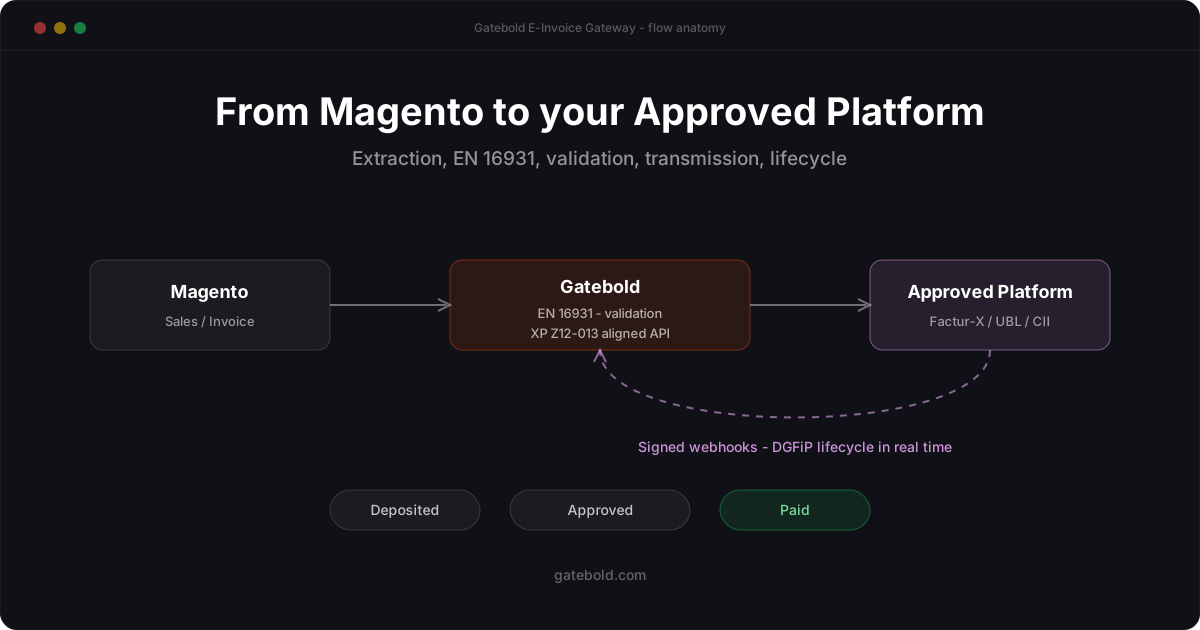
The flow at a glance
Magento (Sales / Invoice)
   │  1. extraction (Gatebold connector)
   ▼
Gatebold platform
   │  2. EN 16931 normalization (canonical JSON)
   │  3. data validation (SIREN/SIRET, VAT, totals, etc.)
   ▼
Approved Platform (DGFiP-registered)
   │  4. regulatory format production (Factur-X, UBL or CII)
   │     legal transmission: recipient's PA + administration
   ▼
DGFiP lifecycle
   │  5. signed webhooks: deposited → ... → paid
   ▼
Gatebold platform + Magento Sales grid
Each step has a precise role and a clear boundary: Gatebold prepares and transports compliant data, the Approved Platform carries the regulatory acts. Here is what actually happens at each stage.
Step 1 - extraction from Magento
The starting point is the invoice Magento natively issues (Sales / Invoice). The Gatebold connector - a standard Magento module installed through Composer - detects the emission and extracts the full data set: header, lines, VAT rates, buyer and seller identities, payment terms, etc.
No business logic is coded in the storefront: the connector extracts, the Gatebold platform decides. That is what keeps Magento upgrades painless - the connector is maintained by Gatebold, and your configuration lives on the SaaS side, not in store code.
Step 2 - EN 16931 normalization
The extracted data is canonicalized into a JSON aligned with the European EN 16931 semantic model - the common core of all reform formats. This is the step that absorbs your Magento’s specifics: custom field names, specific attributes, rounding conventions, etc.
Why it matters: your Approved Platform expects semantically clean data to produce the regulatory format. Rigorous normalization upstream means fewer rejections downstream - and a PA switch that does not threaten your integration, since the canonical model stays the same.
Step 3 - data validation
Before any transmission, each invoice passes a compliance check aligned with the AFNOR XP Z12-013 standard’s rules: SIREN/SIRET validity, French VAT number consistency, totals balance (net, VAT per rate, gross), presence of mandatory fields, etc.
A failing invoice is blocked before the PA, with a precise diagnosis of the offending field. You fix at the source - often a client record in Magento - and replay. This upstream filter spares round-trips with the regulatory circuit and keeps your PA rejection rate at the floor.
Step 4 - transmission to your Approved Platform
Validated data is transmitted to your Approved Platform through an API aligned with the AFNOR XP Z12-013 standard - the interface contract French PAs implement. This is where the role boundary fully plays out:
- Gatebold delivers normalized, validated, traceable data to the PA;
- the PA, registered with the DGFiP, produces the regulatory format (Factur-X, UBL or CII), transmits the invoice to the recipient’s PA and feeds the tax administration.
Step 5 - the DGFiP lifecycle, in real time
Once the invoice is in the circuit, its story is only beginning: the reform defines a normalized lifecycle - deposited, rejected, approved, paid, etc. These statuses are emitted by your PA and received by Gatebold through signed webhooks: each notification is cryptographically verified before being accepted, then recorded.
The result, merchant-side: each invoice’s status is visible in the Magento Sales grid and in the Gatebold platform, without polling anything. A rejected invoice shows up with its reason; you fix, you replay manually, and the new status comes back through the same channel. For an accounting team, this replaces the email + spreadsheet + follow-up trio with a single source of truth.
What this split changes for you
- No format dependency: if your PA moves from Factur-X to UBL, or a version evolves, your canonical EN 16931 data stays valid - the PA adapts its production.
- No PA dependency: the architecture is designed to be multi-PA. You change Approved Platforms without touching your Magento or your mapping.
- No silently broken compliance: between upstream validation and real-time statuses downstream, an anomaly is visible immediately - not at the tax audit.
You invoice from Magento and want to see this flow applied to your own case - your data, your PA, your timeline? Discover E-Invoice Gateway or let’s talk about your project.