



What is PunchOut in B2B eCommerce?
PunchOut lets a buyer browse a supplier's catalog from their own procurement system, then return the cart for internal approval. A plain explanation.
In this article
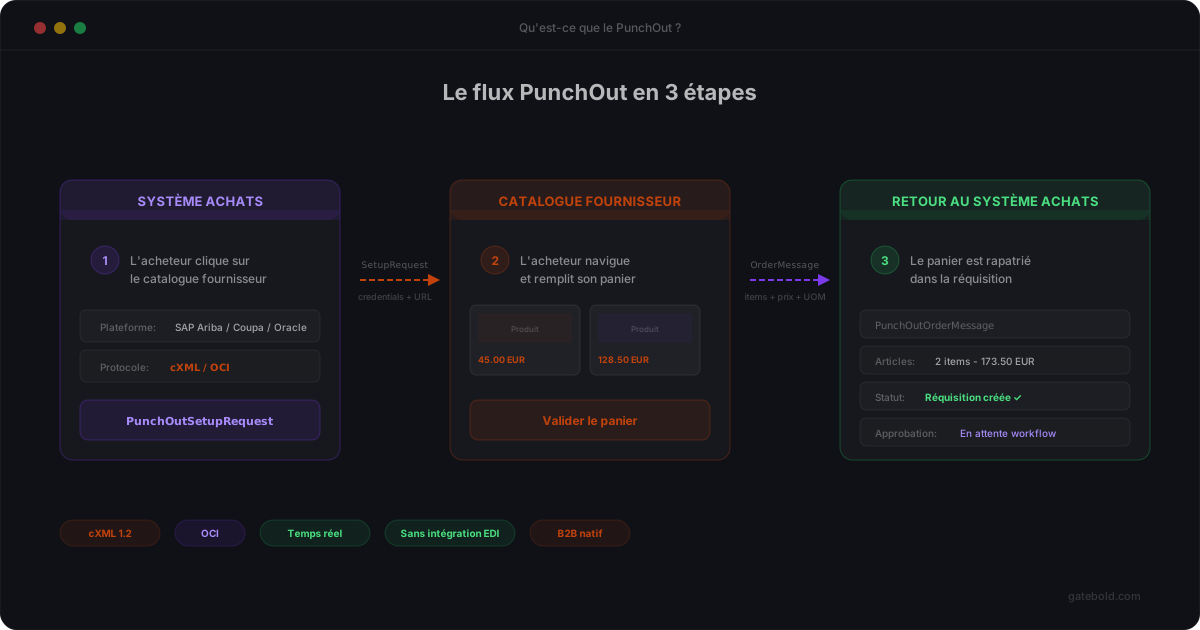
PunchOut is an e-procurement mechanism that lets a buyer (a large enterprise, a hospital, a government agency) browse a supplier’s catalog directly from their own procurement system, then return the cart to that system for internal approval before a purchase order is issued.
For a B2B merchant, supporting PunchOut means opening your store to professional buyers who don’t place orders through a web checkout but through their procurement platform. It’s often a prerequisite for doing business with large enterprise accounts.
Why PunchOut exists
In serious B2B buying, an order is never placed manually on a website. It follows an internal process: request, management approval, budget control, purchase order generation, ERP posting.
The problem: supplier catalogs evolve too quickly to be kept manually in sync inside the buyer’s procurement system. Prices, stock levels, references, variants - all of it changes on the supplier side.
PunchOut addresses this tension. The buyer “punches out” of their system to browse the supplier site directly with fresh data, assembles a cart, then returns that cart to the procurement system where the normal approval and purchase order process continues.
The actors in a PunchOut flow
A PunchOut flow involves three parties:
- The buyer system (the e-procurement system): SAP Ariba, Coupa, Oracle Procurement, Jaggaer, and many others.
- The supplier site: your Magento, Adobe Commerce, or other B2B storefront.
- The end user: a buyer working inside their company’s procurement system.
The communication protocol between the two systems is most often cXML (commerce XML), originally published by Ariba. It defines a set of messages the two parties exchange. The alternative standard OCI, still in use on legacy SAP installations, follows a different logic - see cXML vs OCI for the differences.
The flow, step by step
A typical PunchOut flow goes like this:
- PunchOutSetupRequest - The procurement system sends the supplier a cXML message identifying the buyer and requesting a session. It includes a return URL among other data.
- Start URL - The supplier responds with a URL that the user must be redirected to. This is the entry point into the store with buyer context attached.
- Browsing - The user browses the store normally, with their specific prices, allowed products, and contract terms.
- Cart checkout - The user clicks a “submit to my procurement system” button (naming varies).
- PunchOutOrderMessage - The cart is serialized as cXML and posted to the procurement system via the return URL.
- Back on the buyer side - The cart surfaces in the procurement system where it enters the usual internal approval process before being turned into a real purchase order.
What sounds simple in 6 steps actually hides a lot of subtlety: session management, cookies, product codification, taxes, units of measure, buyer-specific fields. To clearly distinguish the two key messages - PunchOutSetupRequest and PunchOutOrderMessage - see Setup Request vs cart return.
What makes PunchOut hard in practice
- Every buyer has their own particulars. cXML is a standard, but in reality each large account adds its own fields, rules, and internal codes.
- Sessions are fragile. A badly configured cookie, a lost parameter, a malformed URL - and the whole session silently breaks.
- Product mapping is critical. If the codes returned in the PunchOutOrderMessage don’t match what the procurement system expects, the cart never becomes an order. See our guide on UNSPSC mapping in PunchOut for standardized classification.
- Observability is often zero. Without a log of actual cXML exchanges, debugging a PunchOut incident becomes detective work.
This is exactly what our product page covers and what Gatebold addresses with a dedicated PunchOut platform, a structured cXML and OCI mapping model, and real observability.
In short
PunchOut lets a B2B buyer browse a supplier’s storefront from their own procurement system, then return the cart for internal approval. It’s a de-facto standard in enterprise sales, built on the cXML protocol.
For a B2B merchant running Magento or Adobe Commerce, handling PunchOut flows properly unlocks a customer segment that would never go through a regular web checkout - provided you don’t underestimate the implementation and maintenance complexity.