



PunchOut SAP Ariba: integration guide for Magento 2 and Adobe Commerce
SAP Ariba is the most common procurement system in PunchOut projects. This guide covers cXML authentication, credentials, shared secrets, common pitfalls, and the recommended approach for Magento.
In this article
- Why Ariba dominates PunchOut requests
- The PunchOut flow with Ariba
- Ariba’s authentication mechanism
- Simplified Ariba credentials structure
- Common pitfalls with Ariba
- 1. Expiring shared secrets
- 2. Misconfigured credentials
- 3. The return URL
- 4. Price formatting
- 5. Session timeouts
- Testing with Ariba
- How Gatebold simplifies Ariba integration
- Summary
SAP Ariba is the most widely deployed e-procurement platform in the world. If you sell B2B on Magento or Adobe Commerce and a large enterprise asks you for a PunchOut connection, there is a good chance they are on Ariba.
Understanding Ariba’s specifics upfront saves you weeks of trial and error.
Why Ariba dominates PunchOut requests
Ariba is the birthplace of cXML - the protocol was created by Ariba in the late 1990s. It is the most mature and strictest system in its implementation of the standard.
When a buyer on Ariba sends you a PunchOutSetupRequest, they expect a response that complies with the cXML standard as Ariba interprets it. This maturity comes with a downside: the requirements are precise, and error messages are rarely explicit.
The PunchOut flow with Ariba
Here is the complete flow of a PunchOut session between Ariba and your Magento store:
SAP Ariba
Sends a PunchOutSetupRequest (cXML + ANCI credentials)
Supplier
Validates the SharedSecret, creates a session
Supplier
Returns the session URL to Ariba
Requisitioner
Browses the catalog, builds their cart
Catalog
Sends the cart to the supplier via the connector
Supplier
Applies mapping, builds and sends the PunchOutOrderMessage
Ariba’s authentication mechanism
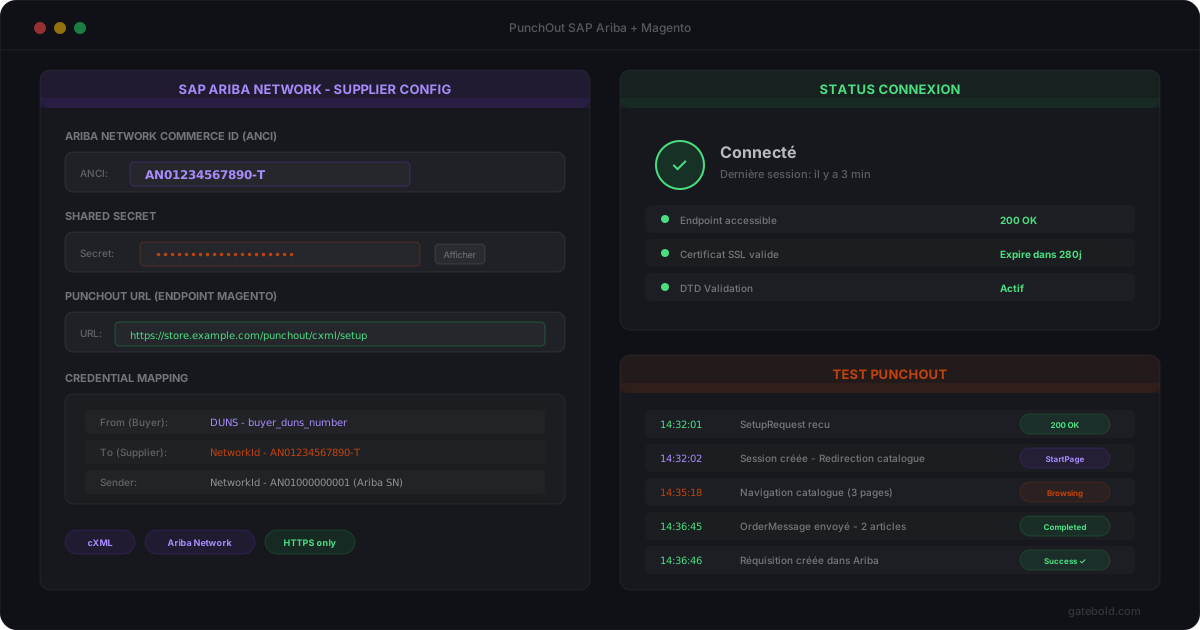
Ariba identifies parties through a credentials system in the cXML header. Three blocks are critical:
- From: identifies the buyer (the client’s Ariba system). Contains the
domainandIdentityof the purchasing organization. - To: identifies the supplier (your store). Must match exactly what was configured in Ariba Network.
- Sender: identifies who is technically sending the message, with a shared secret in
Credential > SharedSecret.
The shared secret is a password shared between your system and Ariba. It is transmitted in plain text in the XML and must be validated server-side before accepting the request.
Ariba also uses a network identifier called ANCI (Ariba Network Commerce ID) that uniquely identifies each organization on the Ariba network. This identifier appears in the From and To credentials and serves as a routing reference.
Simplified Ariba credentials structure
| Block | Content | Role |
|---|---|---|
| From | Credential domain="NetworkId" → Identity = Buyer’s ANCI |
Identifies the purchasing organization |
| To | Credential domain="NetworkId" → Identity = Supplier’s ANCI |
Identifies your store |
| Sender | Credential domain="NetworkId" → Identity + SharedSecret |
Authenticates the technical sender |
Common pitfalls with Ariba
1. Expiring shared secrets
Ariba can enforce shared secret rotation. If your system stores the secret hardcoded in a config file, the connection silently breaks one day with no explicit error message. Secret management must be dynamic and administrable.
2. Misconfigured credentials
Confusing the From and the Sender, or incorrectly extracting the ANCI, blocks authentication. Ariba’s error does not specify which field is wrong - you just see a 401 or 403 rejection on the server side. To recognize and resolve these Status codes, see our guide on how to debug cXML errors.
3. The return URL
The BrowserFormPost contained in the PunchOutSetupRequest must be used as-is to post the PunchOutOrderMessage. Any modification (adding parameters, changing the protocol) breaks the return flow.
4. Price formatting
Ariba expects unit prices with a defined precision (usually 4 decimal places). Incorrect rounding or a tax-inclusive price instead of a tax-exclusive one causes a silent rejection of the PunchOutOrderMessage on the Ariba side.
5. Session timeouts
Ariba enforces session durations. A requisitioner who takes too long on your store loses their session with no actionable message on the supplier side.
Testing with Ariba
Ariba offers a test environment (Ariba Network Test), but accessing it requires your buyer to invite you. The testing cycle is longer than with other systems: expect several round trips with the client’s procurement team.
Typical steps:
- The buyer creates your supplier account on Ariba Network Test
- You configure your credentials (ANCI, shared secret)
- The buyer launches a test PunchOut
- You validate reception, the session, and the cart return
- The buyer verifies the
PunchOutOrderMessagein Ariba - Switch to production
Without observability on cXML exchanges - received payload, sent payload, error codes - each test iteration takes twice as long.
How Gatebold simplifies Ariba integration
Gatebold natively handles Ariba’s specifics:
- Automatic validation of the shared secret and credentials
- Extraction of the ANCI and matching with the configured connection
- Session management with configurable duration per buyer
- cXML mapping tailored to Ariba requirements (price precision, product codes, UNSPSC)
- Complete history of exchanges for fast debugging during the test phase
For a Magento or Adobe Commerce store, this means an operational Ariba integration without custom development and without rewriting the PunchOut layer for each new client.
Summary
SAP Ariba is the procurement system you will encounter most often. Its cXML implementation is strict, its authentication relies on ANCI credentials and a shared secret, and its pitfalls are numerous but predictable. Anticipating these specifics from the start of the project saves weeks of debugging.
For other procurement systems, see our technical articles on Coupa and Oracle Procurement. The principles remain comparable, but each platform has its own authentication and mapping specifics.
If you are preparing an Ariba integration on Magento, let’s talk. For the plan details, see our E-Procurement pricing.