



Setup Request vs cart return: understanding the difference
Two cXML messages, two directions, two distinct moments in a PunchOut flow. Telling them apart avoids most integration mistakes.
In this article
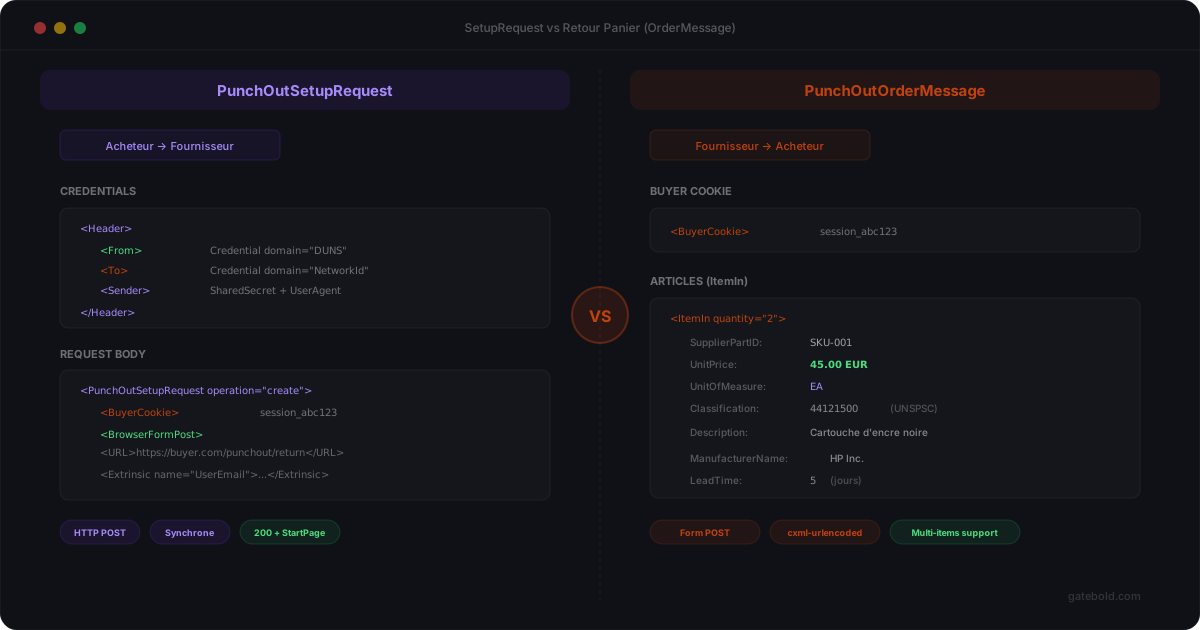
In a PunchOut integration, two cXML messages do the bulk of the work: the PunchOutSetupRequest and the PunchOutOrderMessage. They are often confused in the early stages of a project, even though they have nothing in common.
This article clarifies who sends them, when, and what is actually at stake.
The PunchOutSetupRequest: opening the session
The PunchOutSetupRequest is sent by the procurement system to the supplier’s storefront, at the very start of the flow.
Its role: to announce “a user from X wants to enter your storefront to shop, here’s who they are and where their cart should be sent back”.
Concretely, it contains:
- the buyer’s technical credentials (
Credentialblocks) - information about the user (name, email, sometimes role)
- a return URL (
BrowserFormPost) - optionally a currency, a language, a country
The storefront does not yet receive a cart. It receives a session-opening request, full stop.
Its response - the PunchOutSetupResponse - contains a start URL. The procurement system then redirects the user to that URL, and the browsable session begins.
The PunchOutOrderMessage: returning the cart
The PunchOutOrderMessage is sent by the storefront to the procurement system, at the end of the flow, when the user submits their cart.
Its role: to transmit “here are the items, quantities, prices and codes the user selected; import this into your approval process”.
It contains:
- the original session identity (context recall)
- the list of items (
ItemIn), with quantity, price, description - the product codes expected by the buyer (internal codes, UNSPSC, supplier SKUs)
- the units of measure
- taxes and other contractual data
This is the message that, once on the buyer side, feeds the internal cart for approval.
Why the confusion is dangerous
A developer starting a PunchOut project may be tempted to handle everything in a single flow: “I receive the SetupRequest, I authenticate, I handle the cart, I send it back”.
Except:
- the
SetupRequestarrives before the user has seen a single product; - the
PunchOutOrderMessageis built later, when the cart exists; - the session must be preserved between the two, sometimes for several minutes or more.
Typical bugs come from this confusion:
- session lost between entry and exit (cookie misconfigured, lifetime too short);
- return URL forgotten or badly stored (cart ready but nowhere to send it);
- mapping applied at the wrong stage (on the
SetupRequestinstead of thePunchOutOrderMessage); - unsecured exchanges between systems, exposing credentials and buyer data in transit.
How Gatebold handles it
In Gatebold, these two messages are distinct events inside an explicit session model:
- the
PunchOutSetupRequestopens a session, journaled and observable; - the session carries the context (buyer, user, return URL) all the way to the cart;
- the
PunchOutOrderMessageis built using the buyer’s mapping, validated, journaled; - every exchange is signed with HMAC-SHA256, credentials are encrypted with AES-256-GCM, and no secret ever transits in clear text between systems.
If something goes wrong, you see at which stage - not a vague indistinct error. And security is guaranteed end to end, with no extra configuration on the client side.
This is exactly what the PunchOut feature page covers.
In short
| Message | Direction | When | Contains |
|---|---|---|---|
PunchOutSetupRequest |
Buyer → Storefront | Start | Identity, return URL |
PunchOutOrderMessage |
Storefront → Buyer | End (cart submit) | Items, prices, codes |
Two messages, two directions, two moments. Confusing them means hours of debugging. Telling them apart cleanly is the foundation of a PunchOut integration that survives in production.
To verify that a PunchOutSetupRequest or PunchOutOrderMessage conforms to the official DTD before pushing to production, run it through our free cXML validator - line-by-line errors, no payload storage.