



What is OCI and what is it used for in e-procurement?
OCI (Open Catalog Interface) is the SAP standard for connecting its procurement systems to external supplier catalogs. Simpler than cXML but more limited, and still widely used in the SAP ecosystem.
In this article
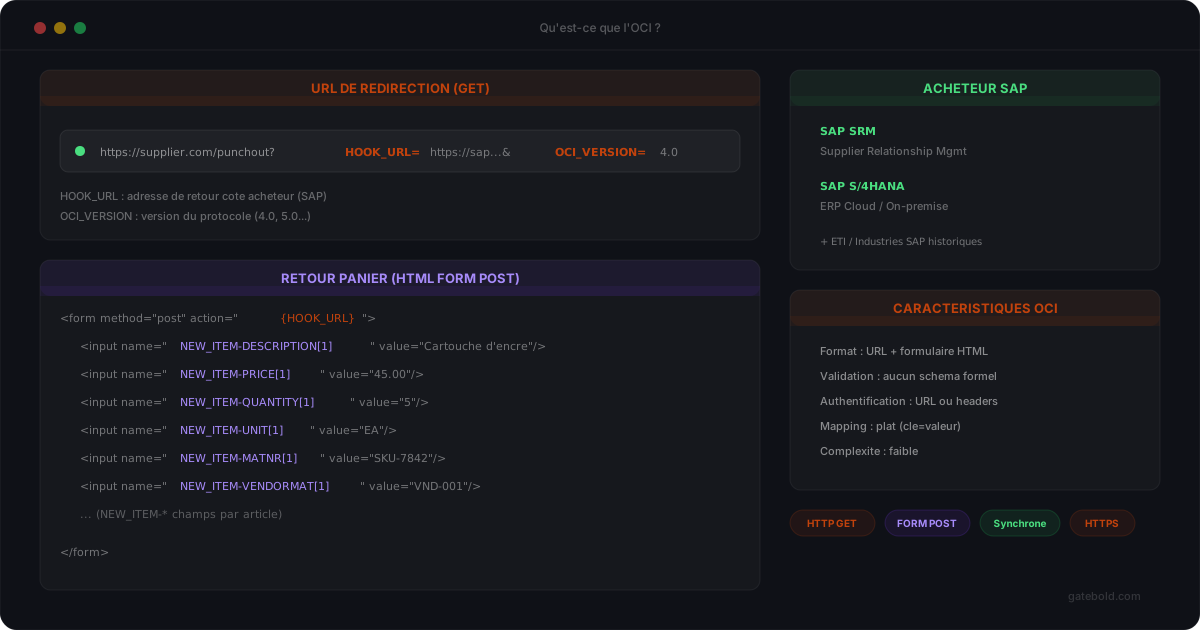
OCI - short for Open Catalog Interface - is an exchange protocol created by SAP in the late 1990s to connect its procurement systems (SAP SRM, SAP S/4HANA) to external supplier catalogs.
It is a simpler mechanism than cXML: no XML, no DTD, no strict validation. OCI relies on URL parameters and standard HTML forms. If you work with a SAP client that does not use Ariba, OCI is most likely the format you will encounter.
What OCI is for
OCI lets a requisitioner from a SAP system “punch out” to a supplier catalog, browse, select items, and send the cart back to the SAP procurement system - without having to maintain the catalog inside SAP.
The goal is the same as cXML PunchOut: leave catalog mastery (prices, stock, references) on the supplier side while keeping the approval workflow on the buyer side. But the technical mechanism is radically different.
It is a specific case of the broader PunchOut concept, with an implementation specific to SAP.
Origins
OCI was created by SAP for its SRM (Supplier Relationship Management) system. Rather than inventing a complex XML protocol, SAP took a pragmatic approach:
- a URL or HTML form to open the session (GET or POST depending on buyer configuration)
- an HTML form POST to return the cart
- standardized field names (
NEW_ITEM-DESCRIPTION[1],NEW_ITEM-PRICE[1], etc.)
No payload signature, no schema to validate, no XML session. Simplicity is the watchword.
The OCI mechanism step by step
The OCI flow comes in three steps:
SAP system
Redirects the requisitioner to the catalog, transmitting HOOK_URL and OCI_VERSION (via GET or POST depending on configuration)
Requisitioner
Browses the supplier catalog, adds items to the cart
Supplier
Generates an HTML form that posts to HOOK_URL with NEW_ITEM-* fields
No XML, no Setup message, no asynchronous validation. The requisitioner browses, validates their cart, and it returns directly to the SAP system via a standard HTML POST.
Key parameters at session opening
When the SAP system redirects to the supplier catalog, it transmits URL parameters:
| Parameter | Purpose |
|---|---|
HOOK_URL |
Return URL on the SAP side - the HTML form must POST the cart to this address |
OCI_VERSION |
Protocol version (4.0, 5.0…) |
~caller |
Calling system identifier (varies by implementation) |
~OkCode |
Expected action code (often ADDI for “add to cart”) |
username, password |
Basic URL-level authentication (depending on buyer configuration) |
Authentication is lighter than in cXML: no SharedSecret in a signed payload, just URL parameters or HTTP headers on the server side.
GET or POST: OCI supports both
OCI allows two HTTP methods to transmit session-opening parameters - both are officially supported by SAP and configurable on the SAP side per catalog (External Web Services customizing transaction).
GET: parameters in the URL (?HOOK_URL=...&OCI_VERSION=4.0&username=...).
- Easier to implement and debug (URL directly testable in a browser)
- Drawback: credentials exposed in server logs, browser history, Referer headers; URL length limited to ~2048 characters
POST: parameters in the HTTP body (auto-submitted HTML form).
- More secure: credentials absent from logs and URL, no leak via Referer
- No size limit
- Harder to test (form or curl-like tool required)
Which one to choose?
- POST as soon as parameters contain
username/passwordor sensitive tokens - this is the recommendation for modern OCI deployments (notably S/4HANA). - GET is acceptable for catalogs without authentication in the OCI parameters themselves (auth handled at another level: IP allowlisting, mutual TLS, session cookie) or in test environments.
On the supplier side, supporting both methods is best practice: your endpoint accepts GET and POST with the same parsing logic, making you compatible with any client configuration without forcing constraints on their IT.
Key cart return fields
The OCI cart is a set of NEW_ITEM-<NAME>[<index>] fields. For each item, you find:
| Field | Purpose |
|---|---|
NEW_ITEM-DESCRIPTION |
Product description |
NEW_ITEM-PRICE |
Unit price |
NEW_ITEM-QUANTITY |
Quantity ordered |
NEW_ITEM-UNIT |
Unit of measure (EA, KG, M…) |
NEW_ITEM-MATNR |
SAP material code (if it exists on the buyer side) |
NEW_ITEM-MATGROUP |
Product category |
NEW_ITEM-VENDORMAT |
Supplier reference |
NEW_ITEM-VENDOR |
Supplier identifier |
NEW_ITEM-CURRENCY |
Currency |
NEW_ITEM-LONGTEXT_<n> |
Long description or comments |
The index [1], [2], etc. identifies each cart line. Three items in the cart = three sets of fields prefixed [1], [2], [3].
For product classification mapping (the equivalent of cXML’s Classification domain="UNSPSC"), OCI uses NEW_ITEM-MATGROUP. This mapping is less standardized than in cXML - each buyer can impose their own taxonomy. See our PunchOut mapping guide for the general principles.
OCI vs cXML: the differences that matter
| OCI | cXML | |
|---|---|---|
| Format | URL + HTML form | Structured XML |
| Creator | SAP | Ariba (acquired by SAP) |
| Authentication | URL parameters or HTTP headers | SharedSecret in payload |
| Validation | No formal schema | Official DTD |
| Complexity | Low | High |
| Systems | SAP SRM, SAP S/4HANA | Ariba, Coupa, Jaggaer, Oracle |
| Mapping | Flat (key=value) | Rich (nested nodes) |
For a deeper look at the gaps between the two protocols, see cXML vs OCI: what is the difference and which one to choose?.
When you will encounter OCI
OCI remains the imposed format in two main cases:
- “Pure SAP” clients: SAP SRM or S/4HANA without an intermediate Ariba layer. The IT department prefers to stay in the standard SAP ecosystem.
- European industrial mid-sized enterprises: many manufacturers have legacy SAP installations still using OCI rather than cXML, sometimes for 15 to 20 years.
If your client uses SAP Ariba, cXML is generally what will be requested - even if the backend is SAP. The presence of Ariba as an intermediate layer flips the protocol.
Limitations to be aware of
- Less rich mapping: fewer fields available than cXML. For fine-grained mapping (precise UNSPSC, complex taxes, contract-negotiated prices), OCI is less expressive.
- No automatic validation: structural errors are discovered on the SAP side at reception, often without an actionable message.
- Lighter security: no payload signature. Security relies on HTTPS and URL-level authentication.
- Versions: there are several OCI versions (4.0, 5.0). The client specifies the version in
OCI_VERSION. Variations are minor but to be anticipated. - Custom fields: some buyers add their own non-standard
NEW_ITEM-*fields (analytical codes, cost centers). As in cXML, the mapping must adapt to each buyer.
OCI and Magento
For a Magento or Adobe Commerce store that needs to serve a SAP buyer in OCI, the implementation on the storefront side is simpler than in cXML: it is an endpoint that generates an HTML form instead of the XML POST flow.
The complexity shifts to the mapping of Magento catalog data onto the NEW_ITEM-* fields. And if your store serves multiple buyers with different systems (some in cXML, others in OCI), you need a unified mapping layer capable of handling both protocols from the same catalog.
In short
OCI is the SAP counterpart to PunchOut, simpler than cXML but also more limited. If you sell to a SAP enterprise account that does not use Ariba, this is most likely the format you will encounter.
The right approach is not to choose between cXML and OCI - it is to handle both. A B2B supplier selling to multiple large enterprises will inevitably encounter both protocols in their connection portfolio.
To test an OCI payload before going live, the free Gatebold OCI validator covers OCI 4.0 and 5.0 rules, catches PRICEUNIT traps, SAP T006 unit mismatches and forbidden indexing - all running 100% in the browser. The OCI fields reference documents all 38 NEW_ITEM-* and setup parameters, with their format, length and version. And 7 OCI PunchOut examples ready to copy or test in the validator help you get started in seconds.