



Published on
What is PunchOut in B2B eCommerce?
PunchOut lets a buyer browse a supplier's catalog from their own procurement system, then return the cart for internal approval. A plain explanation.
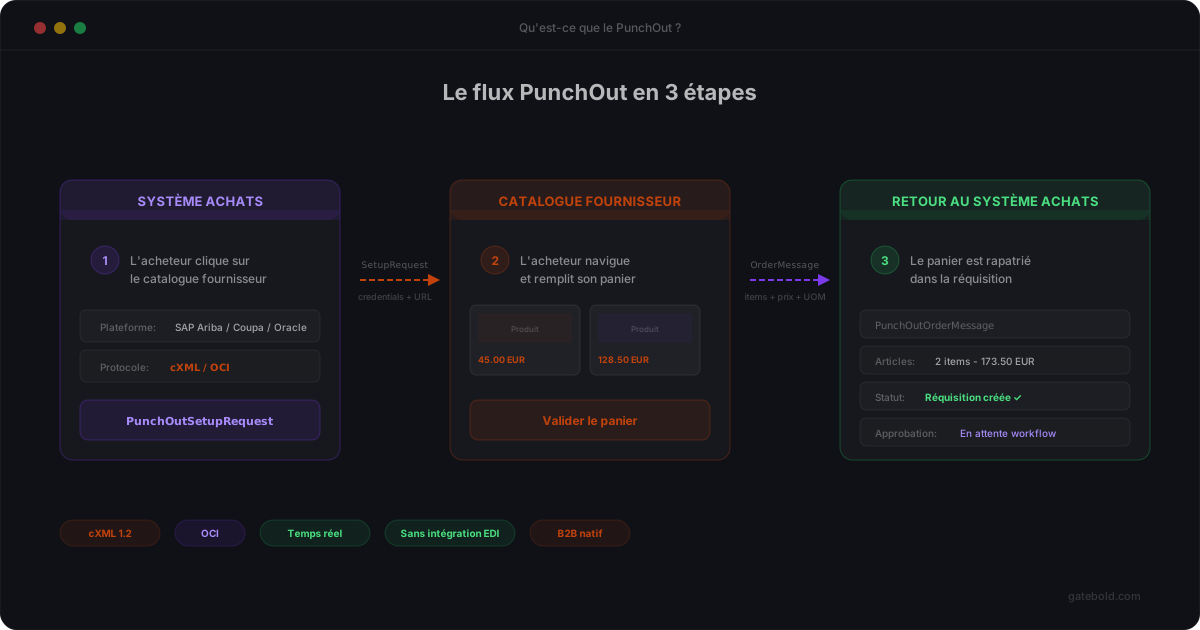
PunchOut is an e-procurement mechanism that lets a buyer (a large enterprise, a hospital, a government agency) browse a supplier’s catalog directly from their own procurement system, then return the cart to that system for internal approval before a purchase order is issued.
For a B2B merchant, supporting PunchOut means opening your store to professional buyers who don’t place orders through a web checkout but through their procurement platform. It’s often a prerequisite for doing business with large enterprise accounts.
Why PunchOut exists
In serious B2B buying, an order is never placed manually on a website. It follows an internal process: request, management approval, budget control, purchase order generation, ERP posting.
The problem: supplier catalogs evolve too quickly to be kept manually in sync inside the buyer’s procurement system. Prices, stock levels, references, variants - all of it changes on the supplier side.
PunchOut addresses this tension. The buyer “punches out” of their system to browse the supplier site directly with fresh data, assembles a cart, then returns that cart to the procurement system where the normal approval and purchase order process continues.
The actors in a PunchOut flow
A PunchOut flow involves three parties:
- The buyer system (the e-procurement system): SAP Ariba, Coupa, Oracle Procurement, Jaggaer, and many others.
- The supplier site: your Magento, Adobe Commerce, or other B2B storefront.
- The end user: a buyer working inside their company’s procurement system.
The communication protocol between the two systems is most often cXML (commerce XML), originally published by Ariba. It defines a set of messages the two parties exchange.
The flow, step by step
A typical PunchOut flow goes like this:
- PunchOutSetupRequest - The procurement system sends the supplier a cXML message identifying the buyer and requesting a session. It includes a return URL among other data.
- Start URL - The supplier responds with a URL that the user must be redirected to. This is the entry point into the store with buyer context attached.
- Browsing - The user browses the store normally, with their specific prices, allowed products, and contract terms.
- Cart checkout - The user clicks a “submit to my procurement system” button (naming varies).
- PunchOutOrderMessage - The cart is serialized as cXML and posted to the procurement system via the return URL.
- Back on the buyer side - The cart surfaces in the procurement system where it enters the usual internal approval process before being turned into a real purchase order.
What sounds simple in 6 steps actually hides a lot of subtlety: session management, cookies, product codification, taxes, units of measure, buyer-specific fields.
What makes PunchOut hard in practice
- Every buyer has their own particulars. cXML is a standard, but in reality each large account adds its own fields, rules, and internal codes.
- Sessions are fragile. A badly configured cookie, a lost parameter, a malformed URL - and the whole session silently breaks.
- Product mapping is critical. If the codes returned in the PunchOutOrderMessage don’t match what the procurement system expects, the cart never becomes an order.
- Observability is often zero. Without a log of actual cXML exchanges, debugging a PunchOut incident becomes detective work.
This is exactly what our product page covers and what Gatebold addresses with a dedicated PunchOut platform, a structured cXML and OCI mapping model, and real observability.
In short
PunchOut lets a B2B buyer browse a supplier’s storefront from their own procurement system, then return the cart for internal approval. It’s a de-facto standard in enterprise sales, built on the cXML protocol.
For a B2B merchant running Magento or Adobe Commerce, handling PunchOut flows properly unlocks a customer segment that would never go through a regular web checkout - provided you don’t underestimate the implementation and maintenance complexity.
If you want to compare your current setup to ours, book 30 minutes with the team.