



Published on
PunchOut for Magento: what to plan before you start
Before starting a PunchOut integration on Magento or Adobe Commerce, six decisions need to be made. Skipping them leads to long, fragile and expensive-to-maintain projects.
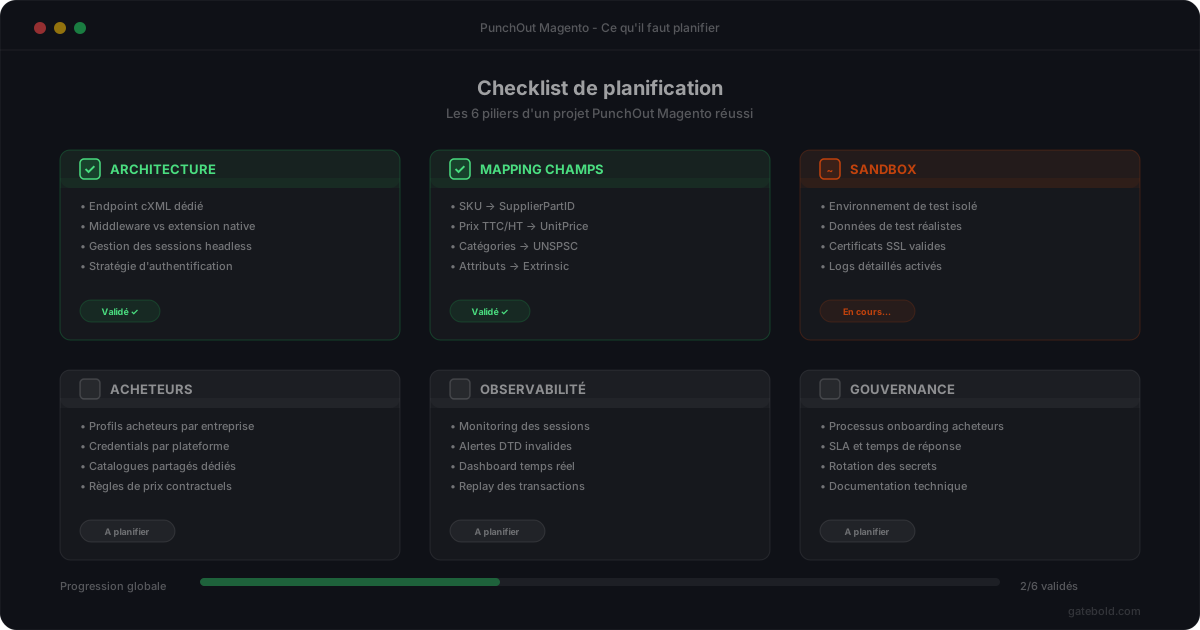
A PunchOut integration on Magento or Adobe Commerce should not be planned like a front-end module. It is a back-office, multi-party, production-sensitive integration. Projects that drift have almost always skipped the same decisions at kickoff.
Here are the six points to clarify before writing the first line of code.
1. Where does the PunchOut logic live?
This is the most structural decision. You have three options:
- Everything in Magento: a custom module carries the cXML protocol, sessions, mapping. Quick to start, painful from the second buyer onward.
- Everything at an external partner: you depend on an agency for every change. Short-term recurring cost is low but the hand-off is difficult.
- Dedicated platform + thin connector: the protocol logic lives in a separate hosted platform, the Magento connector consumes a clear API. This is the Gatebold model.
Your choice drives everything else: hiring, technical debt, speed of onboarding new buyers.
2. How many buyers are you targeting, at 18 months?
A single buyer, or several? This projection radically changes the architecture.
For a single buyer, a passable custom module may suffice - temporarily. For five buyers or more, without a structured mapping model, you will accumulate debt with every connection.
If the commercial roadmap involves several buyers, treat the mapping as a reusable structure from day one.
3. Which procurement systems on the buyer side?
SAP Ariba, Coupa, Oracle Procurement, Jaggaer, other? Each system has its cXML quirks: specific fields, codification conventions, expectations on the PunchOutOrderMessage.
Identify the target systems early. This avoids discovering, in sandbox, that a buyer expects a format completely different from what you had planned.
4. What product mapping?
When the PunchOutOrderMessage reaches the buyer, your product codes must match what their system expects. That is rarely your raw SKU.
Clarify upfront:
- which buyer codes (internal codes, contract references) must appear;
- the required classification (UNSPSC most often, but not always);
- the accepted units of measure;
- how negotiated prices vs catalog prices are handled;
- VAT and other taxes.
Without this upstream work, you will do it under pressure on go-live day.
5. Sandbox vs production, how does it work?
PunchOut is testable in the buyer’s sandbox. This is indispensable.
Anticipate:
- how you trigger a sandbox test from the procurement system;
- how your Magento environments are synced (catalog, prices) with what the buyer sees in sandbox;
- how you switch from sandbox to production without breaking existing sessions.
Many projects discover they had no clear cutover process. The result: lost hours, sometimes production incidents on go-live day.
6. What observability?
When a cart doesn’t reach the buyer, someone has to answer: what happened, exactly?
Without operational observability - transaction history, readable cXML payloads, correlation IDs - your support team will be blind. Every incident will require developer involvement.
Decide early: who should be able to see transactions? Support? Partner integrators? These choices drive the tooling you need to put in place.
In short
A Magento PunchOut project that does not ask itself these six questions upfront always ends up in one of two situations: a custom module impossible to evolve, or a long project that goes well beyond the initial budget.
Conversely, spending half a day framing these points in advance changes the trajectory of everything else.
If you want to discuss it with a specialized team, we are reachable.