



cXML vs XML: what is the difference?
XML is a generic markup format published by the W3C. cXML is a business language built on XML for B2B e-procurement. Every cXML document is XML, almost no XML document is cXML. Explanation with examples.
In this article
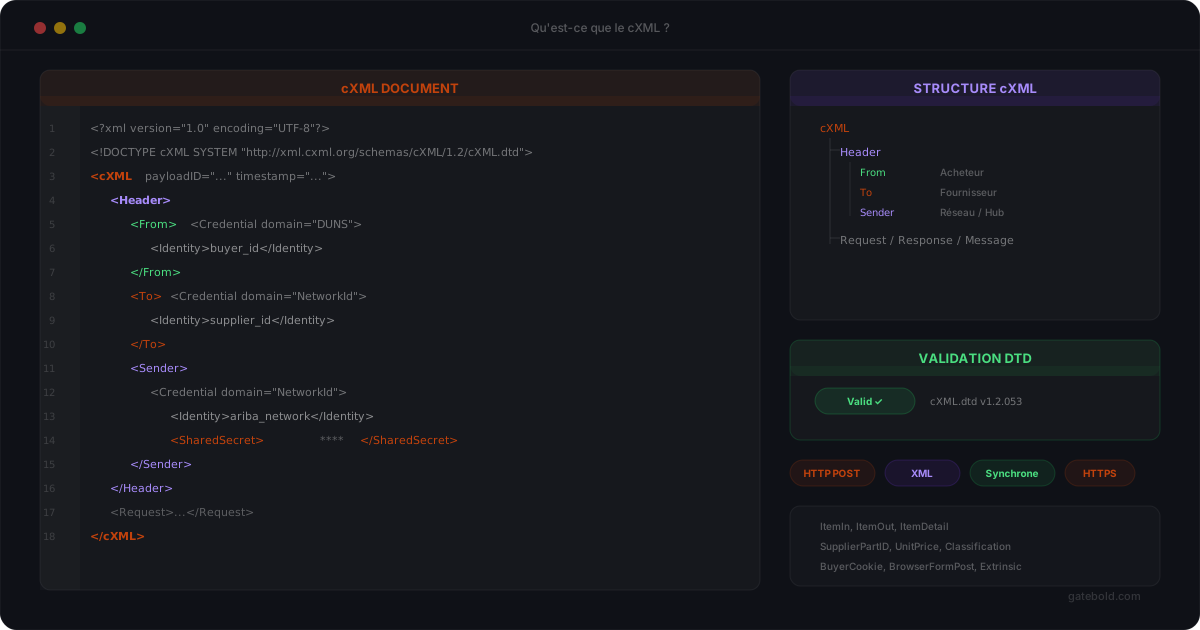
A Magento developer receiving their first PunchOut specification almost always runs into the same question: “they are asking for cXML, is that just XML?”. The short answer is yes and no. This article clarifies the difference between the two, with a comparison table and a concrete example.
The essentials in 3 bullets
- XML is a format: a generic syntax for structuring data with tags, published by the W3C. It says nothing about content.
- cXML is a business language built on XML: it fixes the messages, elements and exchange rules of B2B e-procurement (PunchOut, orders, confirmations, etc.).
- Every cXML document is XML, but almost no XML document is cXML. XML is the alphabet; cXML is one specific language written with that alphabet.
XML: a format, not a protocol
XML (eXtensible Markup Language) is a W3C recommendation published in 1998. It defines a syntax: opening and closing tags, attributes, a declared encoding, a single root, well-formedness rules. Nothing more.
XML defines no vocabulary. A <cart> tag has no more meaning than a <basket> or <x> tag: the application decides. This is precisely what makes XML powerful - you can describe anything - and what limits it: two systems that “speak XML” do not understand each other until they have agreed on the same elements.
To make an XML vocabulary binding, you attach a grammar to it:
- a DTD (Document Type Definition), the historical mechanism built into the XML specification;
- or an XSD schema, more recent and more expressive (data types, namespaces, fine-grained cardinalities).
Saying “our API accepts XML” is therefore like saying “our API accepts text files”: true, but it does not describe the contract.
cXML: a business language built on XML
cXML (commerce XML) is one of these vocabularies. Created by Ariba in 1999, it is today maintained by SAP Ariba as an open standard under a free license: the DTDs and documentation are published on cxml.org. The stable reference version is DTD 1.2.070.
Where XML provides the syntax, cXML provides everything else:
- A catalog of messages, each with a precise intent. The three you will meet in a PunchOut project:
PunchOutSetupRequest(the procurement system opens a session to your catalog),PunchOutOrderMessage(your storefront returns the cart) andOrderRequest(the buyer transmits the firm purchase order). Add to theseConfirmationRequest,ShipNoticeRequest,InvoiceDetailRequest, etc. - A standardized envelope. Every message starts with a
<Header>element containing three identity blocks:From(the logical originator),To(the recipient) andSender(the technical system sending the message, carrying theSharedSecretfor authentication). Each identity is expressed as a<Credential domain="...">with an<Identity>. - A unique message identifier, the
payloadIDattribute on the<cXML>root, together with atimestamp. It is what allows deduplication and tracing of an exchange. - Exchange rules: HTTPS POST,
<Status code="200">responses, error handling through numeric codes. - A public DTD against which every message can be validated.
What cXML brings is therefore a contract: a PunchOutOrderMessage produced by a Magento storefront is readable by SAP Ariba, Coupa, Jaggaer, Oracle, etc. without any prior negotiation on element names. For the details of each message, see What is cXML?.
Comparison table
| Criterion | XML | cXML |
|---|---|---|
| Nature | Generic markup format (syntax) | B2B business language built on XML (vocabulary + exchange rules) |
| Publisher / standard | W3C recommendation (1998) | Open standard created by Ariba, maintained by SAP Ariba, free license |
| Reference version | XML 1.0 (5th edition) | cXML DTD 1.2.070 |
| Validation | Well-formedness; DTD or XSD at the application’s choice | Public DTD on cxml.org (no official XSD) |
| Vocabulary | None: defined by each application | Fixed: cXML, Header, From, To, Sender, Request, Message, ItemIn, etc. |
| Transport | Not specified | HTTPS POST, Status response |
| Uses | Configuration, documents, RSS feeds, SOAP, UBL, Factur-X, etc. | PunchOut, orders, confirmations, ship notices, invoices between buyer and supplier |
| Example systems | Any software handling structured data | SAP Ariba, Coupa, Jaggaer, Oracle Procurement, Ivalua, etc. |
Example: the same cart in plain XML and in cXML
Consider a one-line cart: 10 ink cartridges at EUR 24.90 excluding tax. In plain XML, each team would invent its own structure. Here is a version that is perfectly valid as XML:
<?xml version="1.0" encoding="UTF-8"?>
<cart currency="EUR">
  <line>
    <sku>INK-4821</sku>
    <label>Black ink cartridge</label>
    <quantity>10</quantity>
    <unitPriceExclTax>24.90</unitPriceExclTax>
  </line>
</cart>
This document is well-formed, readable, and completely useless to SAP Ariba or Coupa: neither system knows <cart> or <unitPriceExclTax>.
The same cart in cXML, as a PunchOutOrderMessage (simplified excerpt):
<?xml version="1.0" encoding="UTF-8"?>
<!DOCTYPE cXML SYSTEM "http://xml.cxml.org/schemas/cXML/1.2.070/cXML.dtd">
<cXML payloadID="2026-09-22T10:15:00.123@shop.example.com" timestamp="2026-09-22T10:15:00+02:00">
  <Header>
    <From><Credential domain="NetworkID"><Identity>AN01000000001</Identity></Credential></From>
    <To><Credential domain="NetworkID"><Identity>AN01000000002</Identity></Credential></To>
    <Sender><Credential domain="NetworkID"><Identity>AN01000000001</Identity></Credential>
      <UserAgent>Magento 2 PunchOut</UserAgent></Sender>
  </Header>
  <Message>
    <PunchOutOrderMessage>
      <BuyerCookie>a1b2c3</BuyerCookie>
      <PunchOutOrderMessageHeader operationAllowed="edit">
        <Total><Money currency="EUR">249.00</Money></Total>
      </PunchOutOrderMessageHeader>
      <ItemIn quantity="10">
        <ItemID><SupplierPartID>INK-4821</SupplierPartID></ItemID>
        <ItemDetail>
          <UnitPrice><Money currency="EUR">24.90</Money></UnitPrice>
          <Description xml:lang="en">Black ink cartridge</Description>
          <UnitOfMeasure>EA</UnitOfMeasure>
          <Classification domain="UNSPSC">44103105</Classification>
        </ItemDetail>
      </ItemIn>
    </PunchOutOrderMessage>
  </Message>
</cXML>
More verbose, but every element has a place and a meaning defined by the DTD: the payloadID identifies the message, the BuyerCookie links the cart to the session opened by the PunchOutSetupRequest, the ItemIn carries the quantity, price, unit and UNSPSC classification. Any cXML-compatible procurement system knows what to do with it.
Why this confusion keeps coming back in PunchOut projects
The confusion is not a matter of skill; it comes from the vocabulary used in specifications. Three situations come up often:
- The specification says “XML” while the buyer expects cXML. The Magento team delivers a home-grown XML export, and the first test with the procurement system fails at validation. Asking “which DTD, which version?” at kick-off avoids the bad surprise.
- The team assumes an XML parser is enough. It is enough to read the message, not to understand it. You need to know the semantics of cXML elements (what
operationAllowed="edit"means, when to useSupplierPartAuxiliaryID, etc.) and each buyer’s specific mapping expectations. - XSD validation does not apply. Many modern tools only validate against an XSD schema. Since cXML is described by a DTD, you need a validator that loads DTD 1.2.070 - otherwise you only check well-formedness, which lets most structural errors through.
What about OCI, UBL, EDIFACT?
- OCI (SAP Open Catalog Interface) does not use XML at all: the cart comes back as HTML form fields (
NEW_ITEM-*) - see cXML vs OCI. - UBL (Universal Business Language, OASIS) is another XML vocabulary, described in XSD, used for electronic invoicing rather than PunchOut.
- EDIFACT is an EDI format that predates XML, with its own segment-based syntax, still widespread in logistics and retail.
Validating a cXML message
Before testing with the buyer, validate your messages against the official DTD: the online cXML validator loads DTD 1.2.070 and flags missing, misordered or unknown elements. When the buyer returns a non-200 Status, the cXML error code list gives the meaning of each code and its most frequent causes.
Summary
XML is a format: it says how to write tags, not what they mean. cXML is a business language written in XML: it fixes the messages, headers, identifiers and DTD that make a cart or an order understandable by any B2B procurement system. In a PunchOut project, “XML” is never a sufficient answer: the right question is “which version of the cXML DTD, and which rules are specific to this buyer?”.
Gatebold E-Procurement Gateway handles cXML and OCI PunchOut and the OrderRequest purchase order for Magento 2 - see the product page.